Vault 80
Subscription-free, local-first password manager
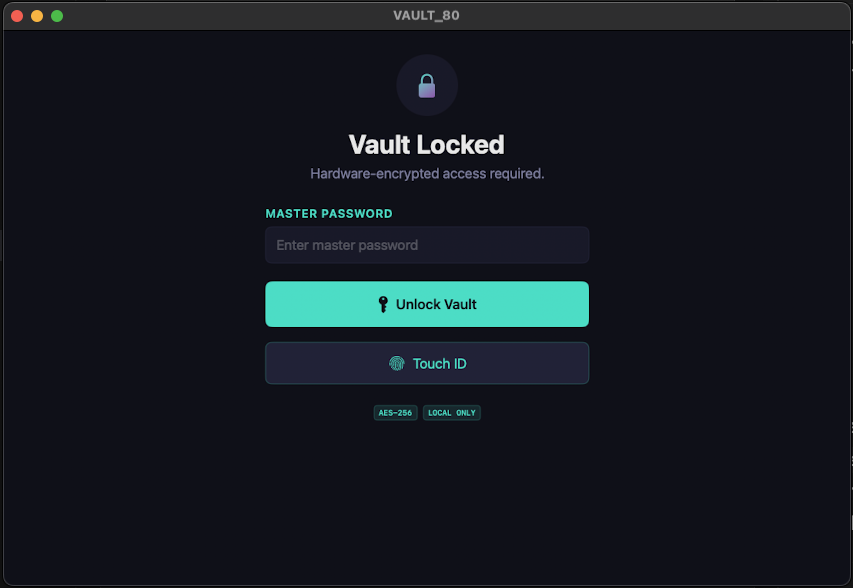
A local-first desktop password manager I built after my 1Password 6 lifetime license stopped working on newer macOS — where the only upgrade path was a subscription. It imports my existing password data and keeps it encrypted on-device, so I get a simple, private vault without paying monthly.
- Role
- Solo — design & build
- Timeline
- 2026
- Focus
- Security & privacy
Tech Stack
A look inside
01 — The Problem
I had a 1Password 6 lifetime license with years of saved passwords, but macOS updates eventually broke the app. The only official path forward was 1Password 7 and its subscription model — paying monthly for access to data I already owned. I wanted a simple desktop tool where I could import my existing password data, encrypt it locally, and keep access on my own terms.
02 — The Solution
Vault 80 is a desktop application that imports password records from CSV, encrypts the stored data, and lets me search and manage entries locally. A packaged version is available on GitHub, so it can be downloaded and used without setting up the development environment.
Process & Timeline
How it came together.
Brainstorming
ChatGPTI shaped and pressure-tested the idea in ChatGPT — my go-to for thinking through concepts. Once it was solid, ChatGPT generated the prompts for the design stage.
Design
Google StitchI fed those prompts into Google Stitch and iterated for two to three hours until I landed on a design I was genuinely happy with.
Build
ClaudeHanding the design to Claude was effortless: I dropped in the Stitch mockups and ChatGPT's requirements, and Claude delivered a working app by the end of the day — plus another day to iron out bugs.
iOS attempt
App StoreI wanted it on my iPhone, but releasing even a free iOS app requires a $99/year Apple Developer license — hard to justify for one or two free apps.
macOS pivot
macOSSo I moved to a macOS desktop app, where I could build and run it freely without the App Store toll.
03 — How It Works
From idea to finished result.
- 1
Import
Existing 1Password data is read and imported, nothing left behind.
- 2
Encrypt Locally
Secrets are encrypted on-device with a master password.
- 3
Unlock
Access requires the master password, or Touch ID.
- 4
Manage
Browse, search, edit, and generate strong passwords.
- 5
Stay in Control
Data never leaves the machine.
04 — Key Features
What it does.
05 — Why It Matters
Password data is personal and sensitive. For my use case, I wanted ownership, local control, and a lightweight app that does one thing well: safely store and access my existing passwords.
06 — Impact & Value
What it’s worth.
No subscription
Replaces a recurring cost with a tool I own outright.
Full control
Data stays encrypted, local, and mine.
08 — What I Learned
Takeaways.
- My biggest mistake was refactoring the old iOS code into the macOS app instead of starting fresh. The iOS and macOS stacks are nearly identical, so converting the design felt like it should be trivial.
- In reality, reworking existing code was far harder than rebuilding it. The AI hallucinated constantly while trying to refactor and re-adjust the old code, burning far more tokens and forcing me to reset permissions repeatedly.
- What should have been a 2–4 hour job turned into a 3–4 day one. Built from scratch, it would have taken roughly a day, plus half a day of bug-fixing.
- The lesson: sometimes starting from scratch is dramatically faster than refactoring — and I will reach for a clean rebuild far sooner next time.
I love turning ideas into practical solutions. Vault 80 is one of many projects where I explore how AI and product thinking can create real value for everyday people.